





Copy-and-paste reporting is the monthly ritual of opening last month’s workbook, pasting in fresh data, fixing whatever broke and sending the result off as if it were new. Every Australian office has someone doing it. Often it is the most careful person on the team, which is exactly why the job lands on them.
Call it a tax, because that is how it behaves. Nobody votes for it, nobody budgets for it, and it gets collected every single month whether or not the report changes. The hours do not show up on a project plan, but they leave your team’s calendar all the same.
This guide explains why copy-and-paste reporting survives in so many workplaces, what it quietly costs, and how to replace it with a report that refreshes itself. You do not need to be a programmer. You need the right handful of Excel skills.
What Is Copy-and-Paste Reporting?
Copy-and-paste reporting happens whenever a recurring report is rebuilt by hand instead of refreshed. A typical version looks like this: someone exports a file from the finance system, a second export from the CRM, and a third from a spreadsheet a colleague emails around. They paste each into the old workbook, drag formulas down, adjust the ranges, check the totals against last month and then reformat everything before it goes to the boss.
Each step is small and reasonable on its own. Together they make a job that takes hours, depends on one person’s memory and breaks if anyone changes a column name. We call that the copy-and-paste reporting tax because the cost is paid again and again, long after the first version was “good enough”.
Microsoft Excel is not the problem. It is a brilliant tool. The problem is treating a spreadsheet like a document you retype each month instead of a small system that takes data in at one end and produces a report at the other.
Why Australian Employees Rebuild the Same Excel Report Every Month
If the rebuild is so wasteful, why does it persist? In our experience training professionals across Australia, the reasons are surprisingly consistent:
- The report lives in a file, not a process. Nobody ever designed it. It grew from a quick one-off request, and each new month became “just copy last month’s”.
- Source data arrives as exports. Systems hand you CSV or Excel downloads, and the easiest thing to do with a download is paste it somewhere.
- Nobody was taught the alternative. Plenty of people use Excel every day for years without meeting Power Query, structured tables or dynamic arrays.
- Fear of breaking it. An inherited workbook with hidden sheets and fragile formulas feels safer to leave alone, even if leaving it alone costs a day a month.
- Fixing it never feels urgent. Rebuilding by hand takes six hours this month, and automating takes a day. The tax always looks cheaper than the cure in the moment.
- Layouts keep shifting. Sources add columns, rename headings or change date formats, so a rigid manual process feels more dependable than an automated one that might error.
The Hidden Cost of Copy-and-Paste Reporting
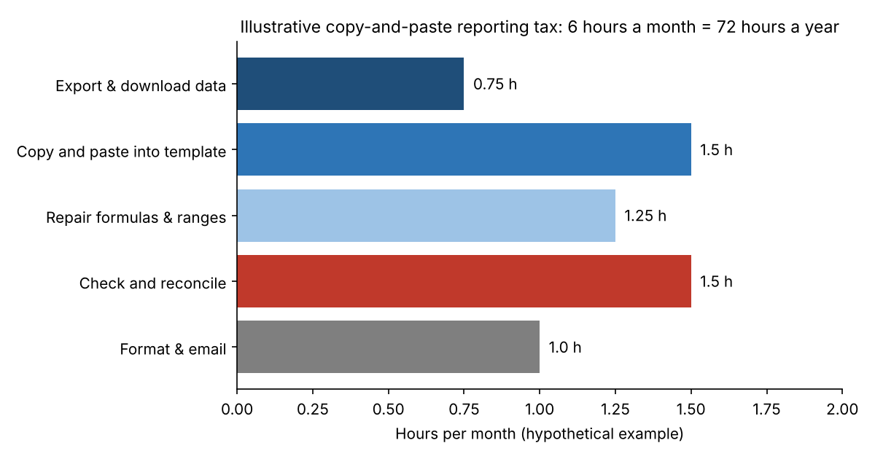
Take a deliberately simple example. Imagine one employee spends six hours a month on a recurring report: forty-five minutes downloading data, ninety minutes pasting it in, seventy-five minutes repairing formulas, ninety minutes checking numbers and an hour formatting and sending. That is 72 hours a year, close to two full working weeks on a standard 38-hour week, for one report. Most teams have several.
The hours are only the first line of the bill. Copy-and-paste reporting also brings:
- Silent errors. A range that stops one row short or a pasted value over a formula can sit unnoticed for months. See our article on the hard-coded number trap.
- Version chaos. Last month’s file, this month’s file and the “final_v3” a manager edited all circulate at once. We cover this in Excel version control.
- Key-person risk. When the one person who understands the workbook goes on leave or resigns, the report stops. Read about the spreadsheet knowledge trap.
- Low trust. If nobody can explain how a number was produced, leaders discount it, and the work that went into it loses value.
- Lost attention. Skilled people spend their best hours moving data around instead of explaining what it means.
Warning Signs You Are Paying the Copy-and-Paste Reporting Tax
Check your own team against this list. If you tick more than two, you are very likely paying it:
- The same report is built from scratch, or from last month’s copy, every reporting cycle.
- Only one person knows how the workbook works, and nobody else has opened it.
- Your process document says things like “paste into column D, then drag down”.
- Month-end is stressful mainly because of file preparation, not analysis.
- Totals are checked by eye against the previous month because no automated check exists.
- Several versions of the same workbook live in email attachments and shared drives. This is the shadow spreadsheet economy at work.
How to Stop Copy-and-Paste Reporting in Excel
You do not have to rebuild everything at once. Start with one monthly report and work through these steps:
- Map the report on one page. List every source, every manual step and every output. You cannot automate what you have not written down.
- Separate data, calculations and output. Keep raw data on one sheet, working calculations on another and the polished report on a third. Then you only ever replace the data.
- Turn data into Excel Tables. Tables expand automatically, so formulas, PivotTables and charts follow the data instead of stopping at an old range.
- Use Power Query to import and clean. Power Query records each step (remove columns, change types, merge files) and replays it on a single Refresh. It is the most effective cure for copy-and-paste reporting in Excel, and it follows the classic extract, transform, load pattern used in professional data work.
- Summarise with PivotTables and modern formulas. PivotTables, XLOOKUP and dynamic arrays rebuild your summary automatically when the data changes, with no dragging formulas down.
- Add automatic checks. A small control panel that compares row counts and totals against the source turns “I think it’s right” into “it reconciles”.
- Automate the last mile. Where formatting or distribution still takes time, a recorded macro, VBA routine or a Power Automate flow can handle it.
- Document it in five lines. Write where the data comes from, how to refresh and who owns it, so the report survives holidays and resignations.
Done properly, the monthly job becomes: drop in the new export, press Refresh All, read the checks, send. A six-hour task becomes a twenty-minute one, and the time goes back to analysis.
Excel Skills and Courses That Remove the Copy-and-Paste Reporting Tax
The steps above are all learnable in a classroom or live online. These Excel Courses Online Australia programs line up with them:
- Microsoft Excel Beginner builds the foundation: clean data entry, formatting and basic formulas.
- Microsoft Excel Intermediate covers the formulas, functions, charts and data organisation that make reports robust.
- Microsoft Excel Advanced goes into PivotTables, macros, data analysis and Power BI, the core toolkit for ending copy-and-paste reporting.
- Excel VBA and Macros Masterclass shows you how to automate repetitive steps once the data side is solid.
- Excel for Accountants, Excel for Project Managers and Excel for HR Professionals apply the same ideas to the monthly reports in those roles.
- Excel for Supply Chain Inventory and Excel for Small Business suit operational teams and owners who run their own numbers.
Browse the full list on the Excel courses page, or look at the MOS exam preparation course if you want a recognised Microsoft credential.
Copy-and-Paste Reporting Across Australian Cities
Copy-and-paste reporting shows up in every capital, with a different accent. In Sydney, finance and professional services teams often rebuild monthly management packs under tight deadlines. Melbourne organisations in healthcare, retail and government commonly stitch together several exports before reporting.
In Brisbane, operations and project teams track contractors and costs in workbooks that get rebuilt each cycle. Perth resources and logistics businesses handle high volumes of site and supply data. Canberra public sector teams prepare recurring reports for layered approval, and Adelaide businesses face the same monthly rebuild whatever the industry.
Wherever you are, you can train through live online classes, with in-person options in major cities. See all Excel course locations across Australia.
Frequently Asked Questions About Copy-and-Paste Reporting
What is copy-and-paste reporting?
It is a recurring report that gets rebuilt by hand each period: exporting data, pasting it into an old workbook, repairing formulas and reformatting, instead of refreshing a report that is built to update itself.
Why do employees rebuild the same Excel report every month?
Mostly because the report was never designed as a process, the data arrives as exports and few people have been shown tools like Power Query and Excel Tables. Manual rebuilding feels safe even when it is slow.
How do I automate a monthly report in Excel?
Put the data into Tables, import and clean it with Power Query, summarise it with PivotTables or modern formulas, add reconciliation checks and press Refresh All each month. Macros or Power Automate can handle formatting and distribution.
How long does it take to learn these Excel skills?
Many learners can build their first refreshable report within days of starting an intermediate or advanced course, because the skills apply straight to their own workbook.
Which Excel course should I start with?
Start with Excel Intermediate if you already use formulas daily, or Excel Beginner if you are newer to spreadsheets. When you are ready for automation, move to Excel Advanced.
Final Thoughts: Stop Paying the Reporting Tax
Copy-and-paste reporting is not a sign of a lazy team. It is the natural result of busy people inheriting a process nobody designed. The way out is small: one report, one afternoon, a few well-chosen Excel skills.
If you would like help building those skills, contact our course advisors or call 1300 649 299. For more practical reading, visit our Excel blog, including our guides to spreadsheet dependency and the spreadsheet version control problem.