


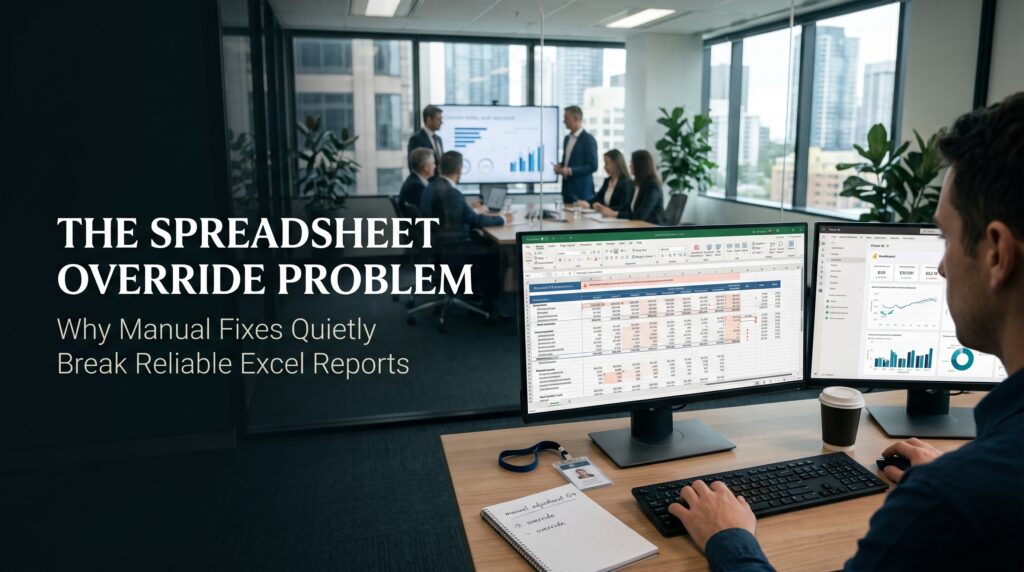
A spreadsheet override happens when someone types a number over a cell that was built to hold a formula. It takes about three seconds, it feels harmless, and it usually happens for a good reason: a deadline, a figure that looks wrong, or a manager waiting for the report. The trouble is that the workbook still looks exactly the same afterwards. The totals still add up, the charts still draw, and nobody can tell that one cell has stopped listening to the data.
That silence is the real danger. A single spreadsheet override can sit inside a monthly report for a year, producing numbers that look professional and are quietly wrong. This guide explains what a spreadsheet override is, why smart people keep making them, how they break Excel reports, and what Australian teams in Sydney, Melbourne, Brisbane, Perth, Adelaide and Canberra can do to find and prevent them.
What Is a Spreadsheet Override?
A spreadsheet override is any manual change that replaces or bypasses the logic a workbook was designed to follow. The most common form is typing a fixed number over a formula. Others are more subtle, and every one of them has the same effect: the cell no longer reflects the underlying data.
- Typing over a formula. Someone replaces a SUM or a lookup with a hard number because the result looked off.
- Pasting values over formulas. A range is copied and pasted as values, which freezes it at a single point in time.
- Plug figures. A reconciliation will not balance, so a small amount is added to force it to agree.
- Hidden adjustments. A row or column is hidden so a manual correction does not draw questions.
- Edited lookup results. The output of a VLOOKUP or XLOOKUP is changed by hand rather than fixing the lookup table.
Each of these is a manual override, and each one turns a living model into a static snapshot. The rest of the workbook carries on as if nothing has changed.
Why People Make a Spreadsheet Override
It is tempting to blame carelessness, but that is rarely the story. Most overrides come from capable people under pressure. Understanding the motive is the first step in preventing the habit.
- Deadline pressure. The report is due in an hour and the formula problem would take longer than that to track down.
- Late or messy source data. An upstream system delivers a wrong figure, and fixing the source is out of the analyst’s hands.
- Not understanding the formula. The person who built the model has moved on, and the next person is afraid to touch the logic.
- Unclear permission. Nobody has said who may change what, so people either avoid fixes or make them quietly.
- “Just this once.” The override is meant to be temporary, and then it is forgotten.
How a Spreadsheet Override Quietly Breaks Excel Reports
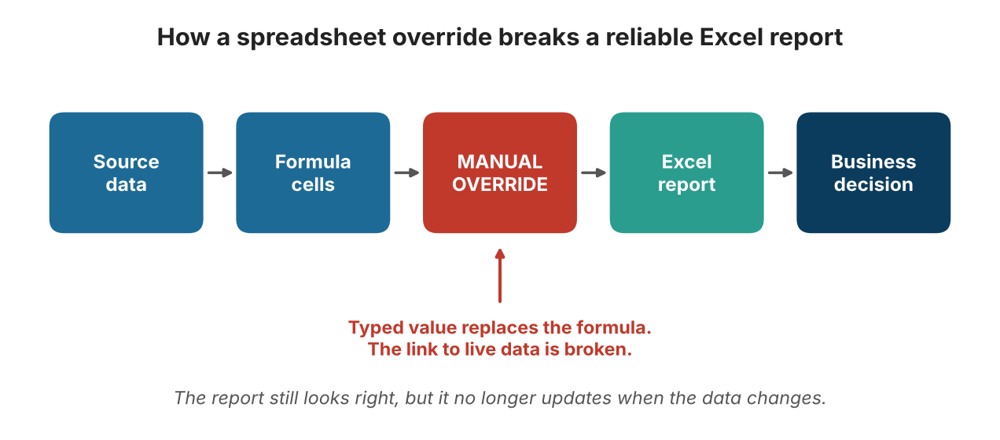
A reliable Excel report depends on a chain: source data feeds formulas, formulas feed summaries, and summaries feed decisions. A spreadsheet override cuts one link in that chain without leaving any visible mark. Here is how the damage spreads.
It Severs the Link to Source Data
A formula updates when its inputs change. A typed number never does. When next month’s data arrives, every connected cell moves except the overridden one, so the report becomes a mix of live and frozen values.
It Hides in Plain Sight
A hard-coded value looks identical to a calculated one. Unless someone clicks into the cell and reads the formula bar, there is no clue. This is closely related to the problem we describe in the hard-coded number trap, where one hidden value makes a whole workbook wrong.
It Survives Every Refresh
Because the override sits inside the file, it outlives every monthly update. Teams roll the workbook forward, change the date, paste in new data, and the old override keeps contributing a stale number to a fresh report.
It Multiplies Across Copies
Once a file is emailed, saved as a copy or reused as a template, the override travels with it. Soon several versions exist, and each one holds different manual fixes. Our articles on Excel version control and the spreadsheet version control problem explain why nobody then knows which file to trust.
It Leaves No Audit Trail
Standard Excel files do not record who changed a cell, when, or why. If the override was made by someone who has since left, the reasoning disappears with them, a pattern we cover in the spreadsheet knowledge trap and spreadsheet dependency.
Spreadsheet Override Examples in Australian Workplaces
These situations are common across Australian organisations, large and small.
- Month-end finance: an accrual is typed in by hand to make a reconciliation balance, then copied into next month’s file.
- Payroll and HR: a leave balance is overwritten because the formula did not handle a part-time arrangement.
- Project reporting: a status percentage is manually set to green before a steering committee, while the underlying tasks say otherwise.
- Inventory and supply chain: a stock count is corrected by hand after a stocktake, but the running formula keeps using the old figure.
- Small business: a quote or Business Activity Statement worksheet is adjusted manually, and the change is never documented.
The Australian Taxation Office sets clear expectations for record keeping, and a workbook full of undocumented manual changes makes those records harder to defend. Even outside tax, a report you cannot explain is a report you cannot rely on.
How to Spot a Spreadsheet Override in Your Workbooks
You do not need special software to find a spreadsheet override. Excel already contains the tools. Work through these steps on any report you depend on.
- Show all formulas. Press Ctrl and the backtick key to switch the sheet into formula view. Numbers sitting among formulas stand out immediately.
- Use Go To Special. Open Find & Select, choose Go To Special, then select Constants to highlight every typed value, or Formulas to see the calculated cells.
- Check the error indicators. The small green triangle often flags a formula that is inconsistent with its neighbours, which is a classic sign of an override.
- Trace precedents. Use the Formula Auditing tools to follow where a figure comes from. A break in the trail means a break in the logic.
- Compare against last period. Roll the file forward with fresh data and see which cells refuse to move.
- Recalculate totals independently. Build a quick pivot table from the raw data and compare it with the report total.
How to Prevent a Spreadsheet Override
Prevention is mostly design. If a workbook makes the right behaviour easy, people stop reaching for the quick fix.
- Separate inputs, calculations and outputs. Keep them on distinct sheets or clearly marked areas so nobody types into a formula range by accident.
- Protect formula cells. Lock calculated ranges and protect the sheet, leaving only input cells editable. Microsoft explains the process in its Excel support guides.
- Create an adjustments column. Give people a legitimate place to enter a correction, with a reason, an owner and a date, rather than overwriting a formula.
- Use Excel Tables and structured references. Formulas then expand automatically as data grows, which removes a common reason to patch cells by hand.
- Add data validation. Restrict what can be typed into input cells so bad values are caught early.
- Automate repeatable clean-up. Tools such as Power Query clean and reshape data the same way every time, so nobody needs to fix it manually.
- Keep a change log. A short tab listing every manual adjustment turns a hidden override into a documented decision.
- Peer review key reports. A second pair of eyes with a simple checklist catches most overrides before they travel.
Writing a Spreadsheet Override Policy
Not every manual change is wrong. Sometimes a human correction is the right call. The goal is to make each one visible and accountable. A short spreadsheet override policy can fit on one page and should answer four questions: when is an override allowed, who may approve it, where must it be recorded, and when must it be reviewed or removed. Putting those answers in writing turns a private habit into a managed process.
Spreadsheet Override Risks Across Australian Cities
The pressure points look slightly different from city to city. Every location below also offers live online options, and you can see them all on our locations page.
Sydney
Finance, insurance and professional services teams in Sydney run tight reporting cycles, which makes last-minute manual fixes especially tempting. See our Excel courses in Sydney.
Melbourne
Melbourne’s healthcare, retail, education and government teams often share workbooks across many hands, so one override can spread widely. Explore our Excel course in Melbourne.
Brisbane
Construction, infrastructure and resources projects in Queensland depend on cost and schedule spreadsheets that must stay accurate. Browse Excel courses in Brisbane.
Perth
Mining and energy businesses in Western Australia handle large operational workbooks, often across remote sites. Check out Excel courses in Perth.
Adelaide
Manufacturing, health and defence-related teams in South Australia rely on dependable reporting. Learn more about training for Adelaide teams.
Canberra
Public sector teams in Canberra work under strict accountability, so documented changes matter. View our Excel courses in Canberra.
Excel Skills That Stop a Spreadsheet Override
Most overrides come from gaps in skill or confidence, not bad intent. When people know how to fix the formula properly, they stop painting over it. These Excel courses online in Australia target exactly those gaps.
- Microsoft Excel Beginner: learn data entry, formatting and basic formulas the right way from the start.
- Microsoft Excel Intermediate: master functions, charts and data organisation so formulas hold up.
- Microsoft Excel Advanced: build pivot tables, consolidation and analysis that rebuild themselves.
- Excel VBA & Macros Masterclass: automate repetitive fixes instead of repeating them by hand.
- Excel for Accountants: reconciliations, reporting and controls for finance work.
- Excel for Small Business: practical spreadsheets for quotes, budgets and records.
- Excel for Project Managers and Excel for HR Professionals: role-based reporting skills.
- Excel for Supply Chain Inventory: keep stock and logistics data accurate.
- MOS Exam Preparation Course: prove your skills with Microsoft Office Specialist certification.
Not sure which level fits? Our FAQ page answers common questions, and the blog has more guides on keeping spreadsheets reliable, including the shadow spreadsheet economy.
Frequently Asked Questions About Spreadsheet Override
What does spreadsheet override mean?
It means manually replacing a formula or calculated result with a typed or pasted value, or otherwise bypassing the logic a workbook was built to follow.
Why is a manual override in Excel risky?
A typed value never updates, looks identical to a calculated one and leaves no record. The report keeps looking correct while slowly drifting away from the real data.
How do I find hard-coded numbers in Excel?
Use Go To Special and select Constants, switch on formula view with Ctrl and the backtick key, and check cells flagged with a green error triangle.
Are manual adjustments ever acceptable?
Yes, when they are recorded in a dedicated adjustments area with a reason, an owner and a date. The problem is the hidden, undocumented change.
Which Excel course helps prevent overrides?
The Intermediate and Advanced courses cover formulas, tables and pivot tables that remove the need for manual patches, and the VBA and Macros course helps automate repetitive corrections.
Final Thoughts: Make Every Manual Fix Visible
Reliable Excel reports are rarely broken by dramatic failures. They are worn down by small, well-meant changes that nobody records. Find the overrides you already have, give people a proper place to make adjustments, and invest in the skills that make a quick patch unnecessary.
Ready to build those skills? Visit Excel Courses Online Australia, explore the full course list, or contact our team or call 1300 649 299 to speak with a course advisor.