




Shadow spreadsheets are the files that quietly run your business while the official system gets the credit. They are the workbook someone built to track approvals because the CRM could not. The tab that fixes the month-end numbers before they reach the ERP. The “final_v7_REAL” file that everyone knows is the one to trust, even though no policy says so.
Every organisation has them. Walk into almost any finance team, warehouse, HR office or project office in Australia and ask, “How does this really get done?” Sooner or later someone will open a spreadsheet and say, “Well, we have the system, but we actually use this.” That hidden layer of work is what we call the shadow spreadsheet economy.
It is not a story about careless staff. Usually it is a story about capable people solving real problems with the tool they know best. This guide explains why shadow spreadsheets appear, what they put at risk, how to bring them under control without breaking the work they support, and which Excel skills make the difference. If you are in Sydney, Melbourne, Brisbane, Perth, Adelaide or Canberra, we also point to training that fits.
What Are Shadow Spreadsheets?
A shadow spreadsheet is any spreadsheet that carries a real business process or decision but sits outside the official, supported system. It is often created by the person closest to the problem, stored on a personal drive or shared by email, and known only to the few people who use it. In IT language this belongs to the wider idea of shadow IT and end-user computing: technology that people build or adopt themselves because the sanctioned option does not quite fit.
The “economy” part matters. These files are not rare oddities. They trade information between teams, feed reports, influence prices and approvals, and keep deadlines intact. In many businesses a surprising share of day-to-day work depends on them.
They tend to share a few traits:
- They were built to solve a specific, urgent problem, not as a long-term solution.
- They depend on one person who understands the formulas and the exceptions.
- They are copied, renamed and emailed, so several versions exist at once.
- They are rarely documented, tested or backed up in a controlled way.
- Other files, reports or decisions quietly rely on them.
Why the Real Process Moves Outside the Official System
Nobody sets out to build a shadow process. It grows from reasonable decisions made under pressure.
- The official system cannot keep up. A change request to the ERP or CRM can take months. A spreadsheet can be built by lunchtime.
- Real work has exceptions. Systems are designed for the standard case. Staff deal with the exceptions, and spreadsheets are where the exceptions live.
- Reporting needs do not match the system’s reports. Managers want a view the system does not offer, so someone exports the data and builds one.
- Spreadsheets feel safe and familiar. People can see every formula, change anything and fix problems themselves without raising a ticket.
- Systems were bought for one thing and used for another. As the business changes, the gap between what the software does and what people need grows.
- Knowledge walks in and out the door. The person who built the workaround leaves or changes roles, and the process survives only because nobody dares to touch the file.
Where Shadow Spreadsheets Hide in Your Business
They appear wherever there is a gap between how the system works and how the work really happens. Here are some of the most common places:
| Team | Typical shadow spreadsheet | What the official system misses |
| Finance | Month-end adjustment and reconciliation workbooks | Manual accruals, timing differences and one-off journals |
| HR | Leave, onboarding and headcount trackers | Approvals, exceptions and reporting that suits managers |
| Operations and supply chain | Stock, ordering and supplier trackers | Real-time stock movements and informal supplier terms |
| Sales | Pipeline and quote calculators | Custom pricing rules and deal-specific discounts |
| Project management | Budget, risk and resource plans | Cross-project views and simple status reporting |
| Small business | One master workbook for quotes, jobs and invoices | Joined-up information in one place |
The Hidden Risks of Shadow Spreadsheets
Shadow spreadsheets deliver real value, which is exactly why they last. But the same qualities that make them quick also make them fragile.
- Key-person risk. If only one person understands the file, their holiday or resignation becomes a business risk.
- Version chaos. When several copies circulate, people make decisions from different numbers and then argue about which one is right.
- Formula and data errors. A broken range, a hard-coded number or a bad lookup can sit unnoticed for months. The European Spreadsheet Risks Interest Group has collected many real examples of how small spreadsheet mistakes cause large problems.
- No audit trail. It is hard to show who changed what and when, which matters for finance, compliance and audits.
- Privacy and security exposure. Spreadsheets full of customer or employee details are often emailed or saved in uncontrolled places. Under the Privacy Act 1988, Australian Privacy Principle 11 expects organisations to take reasonable steps to protect personal information.
- Limits people forget. Older file formats, large data volumes and manual copy-and-paste all create hidden failure points.
These risks are not theoretical. In 2020, Public Health England lost track of thousands of COVID-19 test results because the data was handled in an older spreadsheet file format with a row limit. Investigations into a major bank trading loss in 2012 also pointed to errors in a spreadsheet-based model. In both cases, the people involved were not careless. The tool simply carried more weight than it was designed to carry.
Shadow Spreadsheets Are Not the Enemy
It is tempting to respond with a ban. Resist that urge. A ban rarely removes the need, it just pushes the spreadsheet further out of sight. A better view is that every shadow spreadsheet is a signal. It tells you where the official system is failing the people who rely on it.
The goal is not to eliminate spreadsheets. It is to make the important ones visible, owned, reliable and, where it makes sense, connected to the systems the business trusts. If you want to see how reliable spreadsheets change how people feel about their numbers, read our article on the spreadsheet confidence gap.
A Practical Plan to Bring Shadow Spreadsheets Under Control
You do not need a big program. Start with a small, honest look at the shadow spreadsheets in your team.
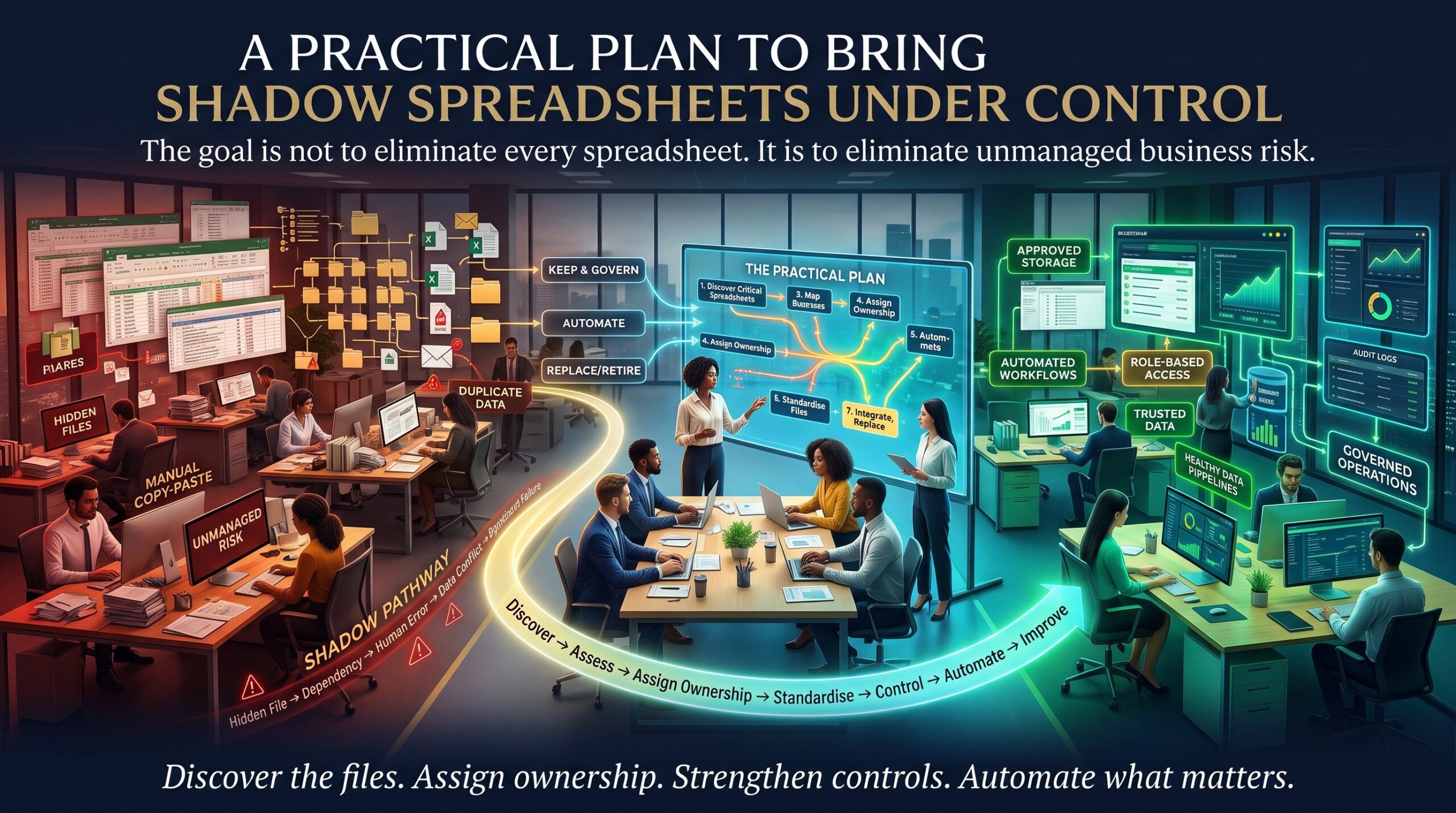
- Find them. Ask each team, “Which spreadsheets would cause trouble if they disappeared tomorrow?” Make it a safe question, not an audit.
- Rank them by risk. Focus first on files that touch money, customers, compliance or key decisions.
- Ask why each one exists. The answer tells you what the official system is missing, which is often more valuable than the file itself.
- Name an owner. Every important spreadsheet needs one accountable person and one backup who understands it.
- Add basic controls. Use tables, data validation, locked formula cells, clear labels, a short instructions tab and version history on OneDrive or SharePoint instead of emailing copies.
- Automate the repetitive parts. Tools such as Power Query can pull and clean data automatically, and macros or Power Automate can remove manual steps that cause errors. Our piece on the copy-and-paste economy explains why this matters for careers too.
- Decide each file’s future. Retire it, keep it with controls, or promote it into a proper system. Review the list every six months.
Notice that the plan relies far more on skills and habits than on buying new software. That is good news, because skills are something your team can build quickly.
Excel Skills That Turn Workarounds Into Reliable Processes
The difference between a risky shadow spreadsheet and a dependable one is usually not the idea behind it. It is how well it is built. People who know Excel properly build files that survive a change of staff. Here are the skills that matter most:
- Structured tables and clean layouts. Data that is easy to read, filter and extend without breaking formulas.
- Data validation and error checks. Drop-downs, rules and checks that stop bad data from entering at the start.
- Lookup functions such as XLOOKUP. Reliable ways to join data instead of copying and pasting between sheets.
- PivotTables and dashboards. Summaries that update from source data, so reports no longer need rebuilding by hand.
- Power Query. Repeatable data cleaning that replaces hours of manual work with a refreshable process.
- Macros and VBA. Automating repetitive steps carefully, with documentation others can follow.
- Documentation and handover habits. A short guide that lets someone else take over without panic.
These skills also change how colleagues see you. The professional who rescues a fragile process and makes it dependable tends to be noticed, a theme we explore in why hardworking employees get overlooked and in the spreadsheet lifestyle tax.
Shadow Spreadsheets Across Australian Cities
The details change from city to city, but the pattern repeats.
- Sydney: finance, insurance and professional services teams often rely on adjustment and reporting workbooks around core systems.
- Melbourne: health, retail, education and logistics teams blend many systems, and spreadsheets frequently fill the gaps between them.
- Brisbane: construction, infrastructure and resources teams often track budgets, schedules and suppliers in spreadsheets alongside project tools.
- Perth: mining, energy and engineering businesses use spreadsheets for asset, maintenance and cost tracking where accuracy is costly.
- Adelaide: manufacturing, defence and health teams often keep local workbooks for compliance and production tracking.
- Canberra: government agencies handle sensitive information, so spreadsheet controls and privacy practices carry extra weight.
Wherever you are, you can learn online with live instructors, and in-person options are available in major cities. See every location on our locations page.
Excel Courses That Build Dependable Spreadsheet Skills
If you want to turn fragile workbooks into reliable tools, start with the course that matches your level and your role:
- Microsoft Excel Beginner: data entry, formatting and basic formulas done properly from day one.
- Microsoft Excel Intermediate: formulas, functions, charts and data organisation for professional tasks.
- Microsoft Excel Advanced: pivot tables, macros and data analysis for people who build and maintain complex workbooks.
- Excel VBA & Macros Masterclass: automate repetitive steps and reduce manual errors.
- Excel for Accountants Course: spreadsheet skills for finance teams that live in month-end workbooks.
- Excel for Small Business Course: keep quotes, jobs and invoices organised in one reliable place.
- Excel for Supply Chain Inventory: build stock and ordering trackers you can trust.
- Excel for Project Managers and Excel for HR Professionals Course: role-focused training for the teams that often own the trackers.
Looking for a broader package? The MS Office Full Bundle and MOS Exam Preparation Course are also available. Browse all Excel courses, read the FAQs or call 1300 649 299 to speak with a course advisor.
Frequently Asked Questions About Shadow Spreadsheets
What are shadow spreadsheets?
They are spreadsheets that run real business processes or decisions outside the official, supported system. They are usually built by staff to fill gaps the system does not cover.
Why are shadow spreadsheets risky?
They often depend on one person, exist in multiple versions, lack an audit trail and may hold sensitive data in uncontrolled places. Small errors can go unnoticed for a long time.
Should a business ban spreadsheets that sit outside its systems?
Usually not. A ban tends to hide the problem. It is better to identify the important files, assign owners, add controls and fix the gaps in the official system that created the need.
How can I make a spreadsheet more reliable?
Use structured tables, data validation, locked formulas, clear documentation and shared version history instead of emailed copies. Automate repetitive steps with Power Query or macros where it makes sense.
Is Excel still a good business tool?
Yes, when it is built and managed well. Excel, which Microsoft keeps developing as part of Microsoft 365 Excel, is flexible and powerful. The problems come when critical processes depend on unmanaged, undocumented files.