
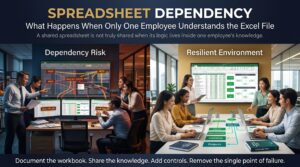




Spreadsheet dependency is what happens when a whole process, report or business decision rests on one Excel file that only one person truly understands. It works beautifully right up until that person goes on leave, changes jobs, or simply forgets why they built a formula the way they did. Then somebody opens the workbook, stares at a wall of nested formulas and mystery tabs, and realises nobody else knows how it works.
If that sounds uncomfortably familiar, you are far from alone. Across Melbourne, Sydney, Brisbane and every other Australian city, finance teams, project offices and small businesses quietly run on workbooks built years ago by one clever colleague. This guide explains the real risks of spreadsheet dependency, the warning signs to look for, and the practical steps that protect your business without banning Excel.
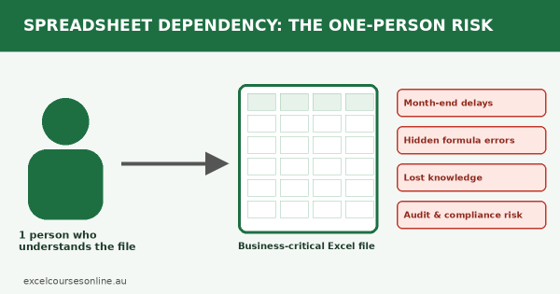
Spreadsheet dependency turns a single Excel file into a single point of failure.
What Is Spreadsheet Dependency and Why Does It Matter?
Put simply, spreadsheet dependency is a form of key person risk. Most businesses think about key person risk in terms of a director or a star salesperson, but it applies just as strongly to a workbook. Think about how many critical outputs start life in Excel: payroll checks, quotes, budgets, stock levels, grant reporting, board packs. If the person who built the file is the only one who can update it, troubleshoot it or explain it, your business has a single point of failure. Some teams call this a low “bus factor”.
The tricky part is that spreadsheet dependency rarely looks like a problem. The file opens, the numbers appear, and everyone is happy. Risk builds quietly as the workbook grows: another tab here, a quick macro there, a few links to other files saved on someone’s desktop. By the time the file is business-critical, it has no documentation, no backup owner and no review process.
Warning Signs of Spreadsheet Dependency in Your Team
Not sure whether you have a problem? See how many of these sound familiar:
- Only one person can run month-end, payroll or reporting from the file.
- The workbook has a nickname, like “Dave’s sheet” or “the master file”.
- Colleagues are nervous about touching it because “it might break”.
- Formulas point at cells like Sheet7!AB214 with no labels and no notes.
- It leans on hidden sheets, external links or macros nobody has ever read.
- Several versions float around by email, with names like Final_v3_REAL_final.xlsx.
- Updating it means hours of manual copying and pasting.
- The owner never takes leave, or the whole team holds its breath when they do.
If you ticked three or more, treat it as a priority rather than a someday project.
What Happens When Only One Employee Understands the Excel File?
Here is what actually goes wrong. The consequences tend to arrive in a fairly predictable order.
Critical Processes Stall Overnight
The first sign is usually slipping deadlines. Invoices go out late, forecasts cannot be refreshed, and a three-day month-end close stretches to eight. Managers who have never opened the file are suddenly expected to rescue it, and every hour spent decoding someone else’s logic is an hour not spent on real work.
Errors Hide in Plain Sight
When nobody else understands the workbook, nobody can check it. A broken range, a number typed over a formula or a lookup pulling from the wrong column can sit there for months. The European Spreadsheet Risks Interest Group has spent years documenting how unchecked spreadsheet errors lead to costly decisions. To see how one buried value can poison an entire model, read our article on the hard-coded number trap.
Knowledge Walks Out the Door
When the owner resigns, retires or is restructured out, years of context leave with them: why that adjustment exists, which customer gets a special rate, what the “temp” column was for. Rebuilding that understanding from scratch is slow, stressful and rarely complete. This is where spreadsheet dependency stops being an annoyance and becomes a genuine business continuity issue.
Burnout and Bottlenecks for the Expert
The expert suffers too. They cannot take a proper holiday, they get messages on weekends, and they quietly become the unofficial help desk. It is the spreadsheet lifestyle tax in action, a topic we explore in how manual processes steal personal time.
Audit, Compliance and Reputation Risk
Auditors, lenders and regulators want to know how a number was produced. If the honest answer is “only Priya knows”, confidence drops fast. Reliable records matter for tax and reporting obligations too, and the Australian Government’s business.gov.au website is a sensible starting point for understanding your recordkeeping responsibilities.
Why Spreadsheet Dependency Happens in Australian Workplaces
Nobody sets out to create it. It almost always grows from good intentions:
- A keen employee solves a problem quickly in Excel, and the solution sticks.
- The workbook keeps growing because it keeps working.
- There is never time to document anything, so the logic lives in one head.
- Official systems do not quite fit the job, so a “shadow” spreadsheet fills the gap. We unpack this in the shadow spreadsheet economy.
- Training is patchy, so only the self-taught enthusiast can build anything advanced.
Add hybrid work, staff turnover and tight budgets, and it is easy to see why spreadsheet dependency shows up in small businesses, councils, not-for-profits and large corporates alike.
A Quick Example of Spreadsheet Dependency in Action
Here is a composite scenario based on situations commonly seen in Australian workplaces. A mid-sized Brisbane distributor ran its pricing through one workbook built by a senior analyst, Mark. It had forty tabs, links to three other files and a macro that refreshed everything each Monday. When Mark took three weeks of leave, the macro failed after a software update. Sales could not quote, the finance manager could not find the fault, and a contractor spent two days untangling it at premium rates.
The actual fix took ten minutes: a broken file path. The cost was thousands of dollars and a lot of stress. Nothing about that story is unusual, which is exactly the point.
How to Reduce Spreadsheet Dependency: 9 Practical Steps
- Map your critical spreadsheets. List every workbook that feeds payroll, invoicing, forecasting or reporting, and note who owns each one.
- Name a backup owner. Every critical file needs a second person who can run it, not just open it.
- Document the logic. Add a “Read Me” tab covering purpose, inputs, outputs, steps and known quirks. Plain English beats clever.
- Simplify the structure. Replace chains of nested IFs with clear lookups such as XLOOKUP, and use Excel Tables and named ranges so formulas read like sentences.
- Separate inputs, calculations and outputs. Colour-code input cells and keep calculations on their own sheet.
- Add checks and validation. Use data validation, locked formulas and check cells that flag when totals do not reconcile.
- Control versions. Keep master files on SharePoint or OneDrive with version history instead of in email threads.
- Review regularly. Ask a colleague to walk through the file each quarter. If they cannot follow it, simplify it.
- Invest in training. The most durable fix for spreadsheet dependency is more people who know Excel well.
Microsoft’s own Excel help centre is a handy free reference for features like tables and data validation. For a broader look at building trust in your figures, see the spreadsheet confidence gap.
Train Your Team to End Spreadsheet Dependency
Documentation helps, but skills matter more. When several people share a solid grasp of formulas, tables, PivotTables and Power Query, the workbook stops being a mystery and becomes a shared tool. Excel Courses Online offers practical training matched to different roles:
- Microsoft Excel Beginner: data entry, formatting and essential formulas for new starters.
- Microsoft Excel Intermediate: lookups, charts, functions and data organisation for everyday reporting.
- Microsoft Excel Advanced: PivotTables, data analysis, dashboards and automation.
- Excel VBA & Macros Masterclass: learn to read, document and safely maintain the macros you already depend on.
- Role-based options: Excel for Small Business, Excel for Accountants, Excel for Project Managers, Excel for HR Professionals and Excel for Supply Chain Inventory.
You can compare everything on the Excel courses page or ask for a recommendation through the contact page.
Excel Courses Across Australia to Fix Spreadsheet Dependency
Whether your team sits in one office or is spread across the country, there is a format to suit. Choose your city:
- Excel courses in Melbourne: in-person classes in West Melbourne, plus live online.
- Excel courses in Sydney: in-person classes in Surry Hills, plus live online.
- Excel courses in Brisbane: in-person classes in the Brisbane CBD, plus live online.
- Excel courses in Perth: live online or in-house team training.
- Excel courses in Adelaide: live online or in-house team training.
- Excel courses in Canberra: live online or in-house team training.
Not sure which city page fits? The full list lives on the Excel course locations page.
Spreadsheet Dependency FAQs
What is spreadsheet dependency?
It is the risk created when a business relies on an Excel file that only one person understands or can maintain. If that person is unavailable, the process behind the file can stall or produce unchecked results.
Why is relying on one employee for an Excel file risky?
Because knowledge is concentrated in a single person. Illness, resignation or even a long holiday can leave the business unable to update, fix or audit an important workbook.
How do I find out which spreadsheets are business-critical?
Ask each team which files they open every week or month, and which ones would cause real trouble if they vanished. Anything tied to money, compliance or customers goes on the list first.
Is replacing Excel with new software the answer?
Sometimes, but not always. New software can reproduce the same problem if only one person understands it. Better documentation and better skills usually deliver the quickest improvement, whatever tool you use.
How long does it take to reduce spreadsheet dependency?
You can make real progress in a week by naming a backup owner and adding a Read Me tab to your most important file. Building deeper team skills takes longer, but it pays off every month afterwards.
Conclusion: Do Not Wait for the Resignation Email
Spreadsheet dependency costs nothing until the day it costs a great deal. The encouraging news is that it is one of the easiest business risks to shrink. Start small this week: pick your most important workbook, name a backup owner and write a Read Me tab. Then build the skills that make the problem go away for good.
Ready to take the next step? Contact Excel Courses Online or call 1300 649 299 to find the right Excel course for your team.