




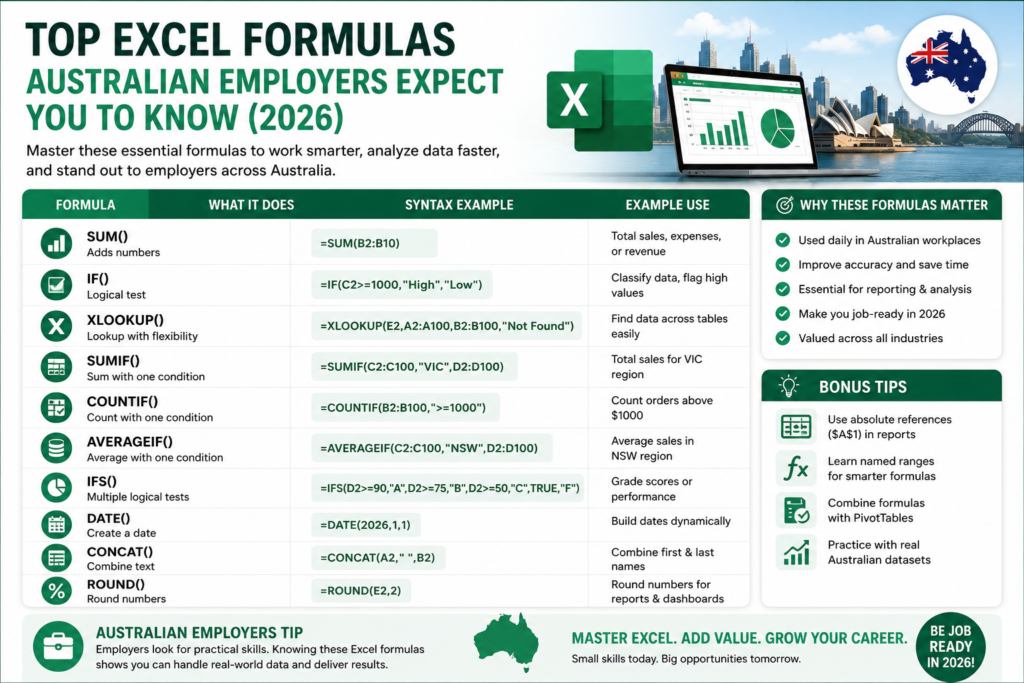
If you’re brushing up on Excel formulas for jobs Australia, you’re focusing on exactly the right skill. From admin assistants to data analysts, Excel formulas remain one of the most consistently requested skills across Australian job ads in 2026. This guide breaks down the best Excel formulas for work, organised by role and skill level, plus where to learn them by city Sydney, Melbourne, Brisbane, Perth, Adelaide, and Canberra.
Why Excel Formulas Still Matter in Australian Workplaces
Despite the rise of specialised BI tools, Excel remains embedded in day-to-day Australian business operations. A widely cited Capital One and Burning Glass Technologies study found Excel skills required across the vast majority of clerical, administrative, engineering, finance, and management roles, and certified Excel users report meaningfully higher promotion and earning rates than non-certified peers. In short, Excel formulas employers want haven’t gone away they’ve just become the baseline expectation across almost every office role in Australia.
Basic Excel Formulas Every Job Seeker Should Know
These are the true fundamentals the Excel formulas for beginners that every job seeker should be comfortable with before applying for office roles.
SUM
Adds a range of numbers together the single most-used formula in any spreadsheet, from expense totals to sales figures.
AVERAGE
Calculates the mean of a data range, commonly used for reporting average sales, scores, or response times.
MIN and MAX
Quickly identifies the smallest or largest value in a dataset, useful for spotting outliers or best/worst performers.
COUNT and COUNTA
COUNT tallies numeric entries, while COUNTA counts any non-blank cell both essential for quickly checking data completeness.
Most In-Demand Excel Formulas for Office Jobs
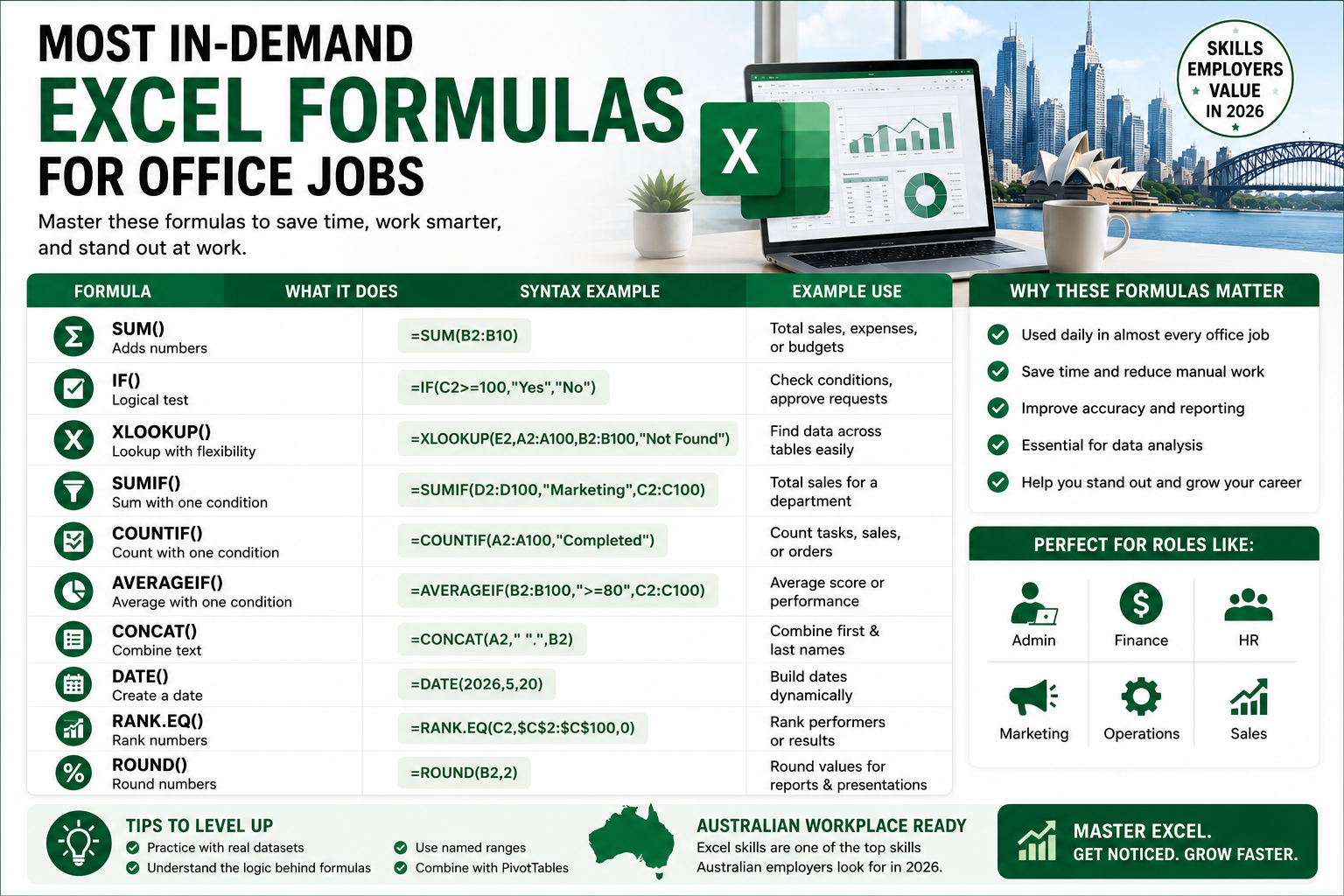
Once the basics are covered, these formulas separate confident applicants from the rest of the pile.
IF
Applies conditional logic flagging overdue invoices, pass/fail results, or stock below a reorder point and underpins most of the more advanced formulas on this list.
IFERROR
Catches and replaces formula errors with a clean message instead of a distracting #N/A or #DIV/0!, keeping reports professional.
SUMIF and SUMIFS
SUMIF totals values matching a single condition; SUMIFS extends this to multiple conditions for example, total sales for a specific product in a specific region and month.
COUNTIF and COUNTIFS
Counts entries matching one or more conditions, widely used for tracking attendance, overdue tasks, or how many records meet a business rule.
Lookup Formulas Employers Often Expect
Lookup formulas are where Excel really earns its place in Australian offices pulling matching data across sheets instead of manually searching.
VLOOKUP
VLOOKUP in Australia remains the most commonly referenced lookup formula in job ads, even as newer alternatives emerge, largely because so many existing workbooks still rely on it and it’s what most training has historically covered.
XLOOKUP
XLOOKUP Excel is the modern replacement for VLOOKUP, searching in any direction, defaulting to exact matches, and handling missing values without wrapping everything in IFERROR. Microsoft’s own XLOOKUP documentation confirms it can even return multiple columns from a single formula a genuine time-saver once you’re comfortable with the syntax.
INDEX MATCH
INDEX MATCH combines two formulas to replicate and in some cases outperform VLOOKUP, particularly for left-side lookups. It’s still common in older or more complex Australian workbooks, so it’s worth knowing even if XLOOKUP is now your default.
Text Formulas for Cleaning Workplace Data
Messy data is a daily reality in most Australian offices these formulas help clean it up fast.
LEFT, RIGHT and MID
Extracts a specific number of characters from the start, end, or middle of a text string handy for pulling area codes or reference number segments.
CONCAT and TEXTJOIN
Combines text from multiple cells into one merging first and last names, or building full addresses from separate columns.
TRIM
Removes extra spaces from text, a small but common fix that prevents lookup formulas from silently failing on messy imported data.
TEXT
Formats numbers or dates as text in a specific style, useful for generating consistent invoice numbers or formatted report labels.
Date and Time Formulas Used in Australian Workplaces
Date-based reporting is everywhere in Australian admin, HR, and finance roles these formulas keep it accurate.
TODAY and NOW
Returns the current date or date and time, commonly used to calculate ages, overdue days, or timestamp reports automatically.
DATEDIF
Calculates the difference between two dates in days, months, or years a staple for tracking tenure, contract length, or leave balances.
EOMONTH
Returns the last day of a month a specified number of months before or after a given date, useful for billing cycles and reporting periods.
NETWORKDAYS
Counts working days between two dates, excluding weekends, widely used for project timelines and leave calculations.
Excel Formulas for Finance and Accounting Jobs
Excel formulas for finance jobs and Excel formulas for accounting jobs typically lean on SUMIFS for category-based totals, IF statements for flagging discrepancies, and VLOOKUP or XLOOKUP for reconciling transactions against a master ledger. Accuracy formulas like IFERROR and TRIM matter just as much here, since even small errors compound quickly in financial reporting.
Excel Formulas for Admin and Office Support Jobs
Excel formulas for admin jobs and general office support roles centre on COUNTIF/COUNTIFS for tracking records, IF for simple flags, and VLOOKUP for pulling client or staff details quickly. These roles rarely need advanced formulas confidence with the fundamentals is usually enough to stand out.
Excel Formulas for Data Analyst Jobs
Excel formulas for data analyst jobs go furthest up the difficulty curve SUMIFS and COUNTIFS for multi-condition summaries, XLOOKUP and INDEX MATCH for merging datasets, and IFERROR throughout to keep dashboards clean. Analysts are also expected to pair these formulas with PivotTables for deeper summarisation.
Excel Formulas for HR and Payroll Jobs
Excel formulas for HR jobs and Excel formulas for payroll jobs rely heavily on DATEDIF and NETWORKDAYS for leave and tenure tracking, VLOOKUP or XLOOKUP for matching employee records across systems, and SUMIFS for calculating totals like overtime or allowances by department.
Excel Formulas for Project Management Jobs
Excel formulas for project management commonly include NETWORKDAYS for timeline tracking, IF for status flags (on track, at risk, overdue), and COUNTIFS for summarising task completion across a team or project phase.
Beginner vs Advanced Excel Formulas: What Is the Difference?
Beginner Excel formulas SUM, AVERAGE, basic IF, COUNTIF cover most entry-level admin and support roles. Advanced Excel formulas SUMIFS/COUNTIFS with multiple conditions, XLOOKUP, INDEX MATCH, and nested IF statements are what separate intermediate and senior candidates, particularly for finance, data analyst, and reporting-focused positions.
How Long Does It Take to Learn Excel Formulas?
Most beginners can become confident with the fundamentals SUM, IF, basic lookups within two to four weeks of regular practice. Reaching a genuinely job-ready intermediate level, including SUMIFS, COUNTIFS, and XLOOKUP, typically takes six to eight weeks of consistent, hands-on practice rather than passive video watching.
Do You Need Excel Formulas Before Learning Power Query or Power BI?
Yes, ideally. Power Query and Power BI both assume you understand how data is structured and how formulas manipulate it skipping straight to these tools without a formula foundation tends to slow learners down rather than speed them up. Mastering core Excel formulas first makes the jump to Power Query and Power BI noticeably smoother.
Best Excel Course to Learn Job-Ready Formulas
Whether you’re looking for an Excel course in Sydney, Melbourne, Brisbane, Perth, Adelaide, or Canberra, or prefer the flexibility of an online Excel course in Australia, the strongest options combine formula training with real, job-style datasets rather than generic tutorial examples. Our own breakdown of Excel skills for jobs in Australia maps exactly which formulas matter at each proficiency level, alongside realistic salary benchmarks by city, and our roundup of the top Excel skills every professional must learn is a useful next step once formulas feel comfortable.
FAQs About Excel Formulas for Jobs in Australia
What Excel formulas are most used in jobs?
SUM, IF, VLOOKUP, and SUMIFS are among the most frequently used Excel formulas across Australian office roles, regardless of industry.
Is VLOOKUP still useful in 2026?
Yes. VLOOKUP in Australia remains common in existing workbooks and job ads, even as XLOOKUP becomes the preferred formula for new spreadsheets.
Should I learn XLOOKUP or VLOOKUP first?
Learn VLOOKUP first if you’re a complete beginner, since it’s still widely referenced in job ads and older files, then move to XLOOKUP once you’re comfortable it’s easier to use and handles more scenarios cleanly.
What formulas do employers expect for admin jobs?
Excel formulas for admin jobs typically centre on SUM, IF, COUNTIF, and VLOOKUP enough to manage records, flag issues, and pull matching data confidently.
What Excel formulas are needed for data analyst jobs?
Excel formulas for data analyst jobs typically include SUMIFS, COUNTIFS, XLOOKUP or INDEX MATCH, and IFERROR, usually paired with PivotTable skills for deeper analysis.
Can learning Excel formulas help me get a better job?
Yes. Certified and formula-confident Excel users are consistently rated more employable across Australian job listings on Seek, and formula skills often unlock a meaningful salary jump between entry-level and intermediate roles.
Build Job-Ready Excel Formula Skills Online
The Excel formulas Australian employers expect in 2026 aren’t as intimidating as they first look — a solid grip on SUM, IF, SUMIFS, and a lookup formula like VLOOKUP or XLOOKUP will carry you through the vast majority of office, admin, finance, and data roles. Build the fundamentals first, layer in the more advanced formulas as your role demands them, and you’ll be well ahead of most applicants in Sydney, Melbourne, Brisbane, Perth, Adelaide, and Canberra alike.
Ready to build job-ready Excel skills? Explore our beginner and intermediate Excel courses online designed for Australian job seekers.